Drink the Ocean Controls
On a computer, the Drink the Ocean controls use the keyboard and mouse: W A S D to walk, the mouse to look around, left click to drink through your straw, 1, 2, 3 to switch tools and Tab to free the mouse cursor. The game shows the same short list on its "Click to play" panel every time it starts. Everything on this page was checked in the browser version on this site on November 19, 2026, on a desktop computer. Play Drink the Ocean on the home page and keep this guide open in another tab.
Drink the Ocean controls on keyboard and mouse
- W A S D: walk. W moves you forward. Walk to the water's edge to drink, then to the press to turn the water into salt. A small arrow at the top of the screen shows how far away the shop is.
- Mouse: look around. Moving the mouse turns your view, and the small circle in the middle of the screen is where you aim.
- Left click: drink. Stand at the water, face the sea and click. Every sip fills the belly bar in the top-left corner, and one of the first tasks simply tells you to keep clicking until your belly is full.
- 1, 2, 3: switch tools. Key 1 is the straw you start with. Tools 2 and 3 show a padlock until you buy them, and their keys do nothing before that. The Drink the Ocean upgrades guide lists the tools in the shop and what they cost.
- P: settings. Opens the settings panel described below. Press P again or click Done to close it.
- Tab: free the mouse. While you play, the game holds on to your cursor. Tab lets it go so you can use the rest of the page, the Fullscreen button or another browser tab. The hint in the bottom-left corner switches to "Tab: back to the game", and one click on the game picks up where you stopped.
- F: Drink ×2 for 3 minutes. The pink button under the task card carries an F label and is marked AD: it offers "DRINK ×2" for three minutes in exchange for watching an ad. It is optional, and we didn't use it.
Pinidi Studio's description of the game also lists Space to jump and E to open the duck's gifts. In our test session these two keys didn't show a visible change, so we can't describe them in more detail yet. T belongs to the Recall Ring: the shop sells it for 10 salt in the Body tab and says it lets you press T to go home to the press and shop, once every 10 seconds. We hadn't bought it, which is why T did nothing in our test.
What the Drink the Ocean screen shows
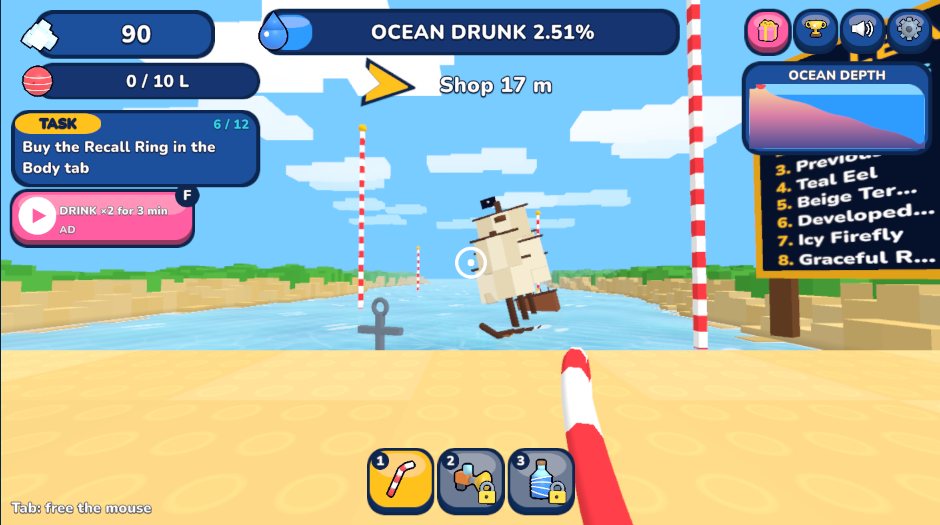
Knowing the screen makes the Drink the Ocean controls easier to learn, because most of what you press changes one of these numbers:
- Salt counter (top left): your money. Salt comes from pressing the water you drank.
- Belly bar (under the salt): how many liters you are carrying and how many fit. A new belly holds 10 liters.
- Task card: a 12-step list that walks new players through the basics, one step at a time.
- Ocean Drunk (top center): how much of the sea you have already emptied, as a percentage.
- Ocean Depth chart (top right): a side view of the seabed, so you can see how far the water still has to drop.
- Four round buttons (top right): a gift, a trophy, the sound switch and the settings gear.
- Tool bar (bottom center): slots 1, 2 and 3, matching the number keys.
Two signals tell you what to press next. The crosshair turns green when the water is close enough to drink; with the starting straw that is about 6 m, so after a few sips you step closer to the shore. When the belly bar is full, the game shows "Belly full! Run to the press" with arrows pointing the way, and in our test the press was 32 m from where we drank.
Settings
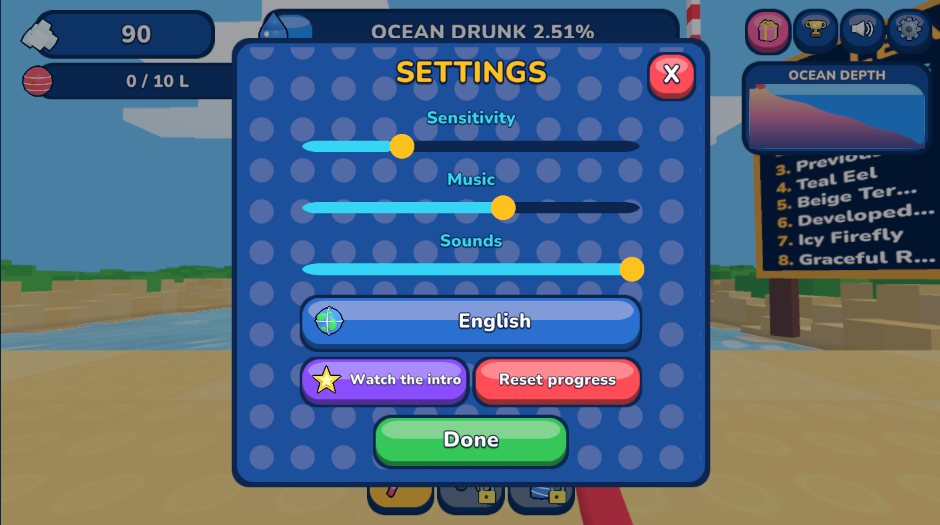
Press P to open the settings panel. These are the options it shows:
- Sensitivity: how fast your view turns when you move the mouse. Turn it down if aiming feels jumpy, up if turning around takes too long.
- Music and Sounds: two separate volume sliders.
- Language: the button shows the language the game is using.
- Watch the intro: plays the opening again.
- Reset progress: starts the whole game over.
Be careful with that last button. The game keeps your progress in the browser you play in: in our test, the salt, the Ocean Drunk meter and the task list were all still there a day later, while a different browser started from zero salt. Reset progress throws that away, and so does clearing your browser data.
Drink the Ocean controls on a phone or tablet
Pinidi Studio lists Android and iOS for this version, so it also runs in a mobile browser with nothing to install. According to the developer's description, on a touch screen you hold the DRINK button to drink instead of clicking. The game is made for landscape, so turn your phone sideways and tap Fullscreen under the game for the biggest view. We have checked the controls on a desktop computer, not on a real phone. If something works differently on yours, tell us in the comments on the home page.
Control problems and quick fixes
- The keys do nothing. Click inside the game first. It only listens to the keyboard after you click to play, or click to continue after pressing Tab.
- Your cursor disappeared. That is normal while you play. Press Tab to get it back.
- The view turns too fast or too slow. Change Sensitivity in the settings (P).
- Clicking doesn't fill your belly. Walk right up to the water and face the sea before you click.
- You can't pick tool 2 or 3. They stay locked until you buy them with salt.
- The game won't start at all. That is a loading problem rather than a controls problem. The loading fixes on the home page go through it step by step.
Looking for a download instead? Our Drink the Ocean Steam and app check shows what we found in each store; the browser version needs no download.
Ready to try them? Play Drink the Ocean: the game is at the top of the home page, and the Drink the Ocean controls above work the moment you click to play.